



timveroOS 8.4: Current Data in Every Decision and Launches on Schedule
Version 8.4 shows underwriters what changed when data is requested again, launches credit products at a set time and makes configuration transfers traceable.
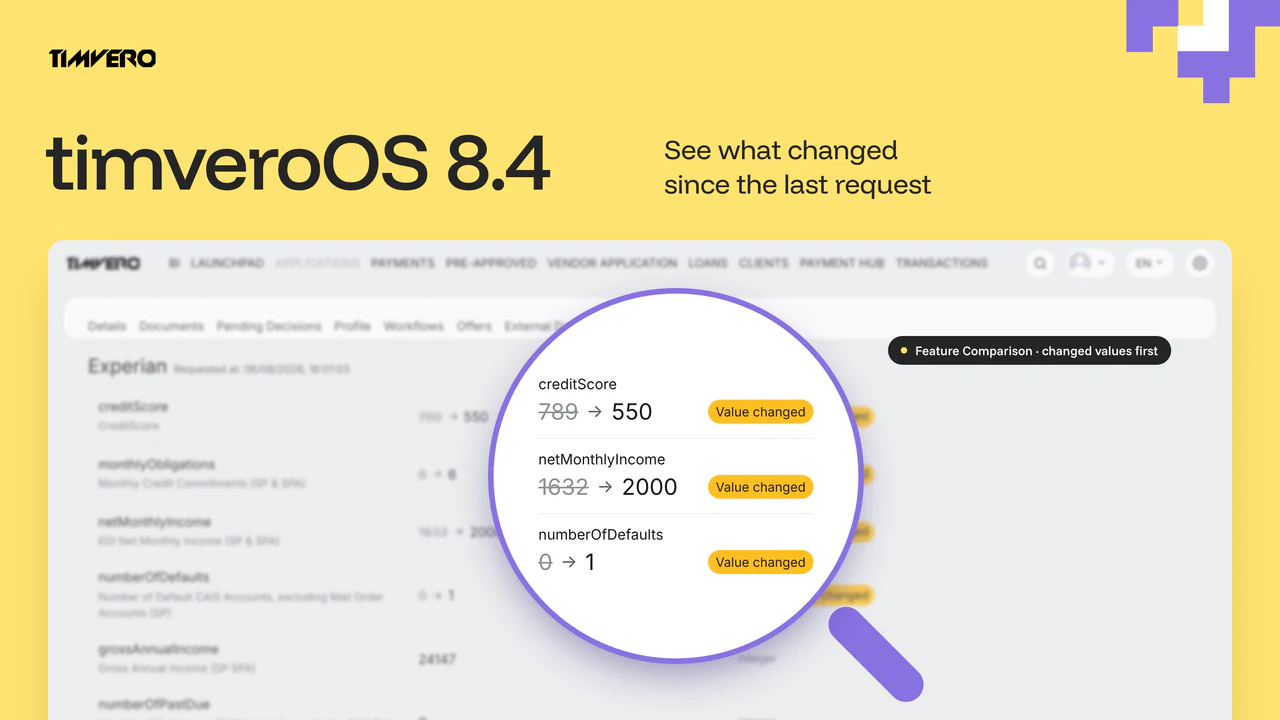
Version 8.4 is a release about keeping decisions current and launches on schedule. When a data source is requested again, underwriters see at once which values changed since the last response. A credit product goes live at the date and time set for it, one workflow node saves every profile attribute a step produces, and configuration moves from test to production with separate rights, file details and a log of every operation.
For changes to whole lending products, see how timveroAI drafts the change for your team to approve before it runs.
What’s in timveroOS 8.4
The release covers five areas:
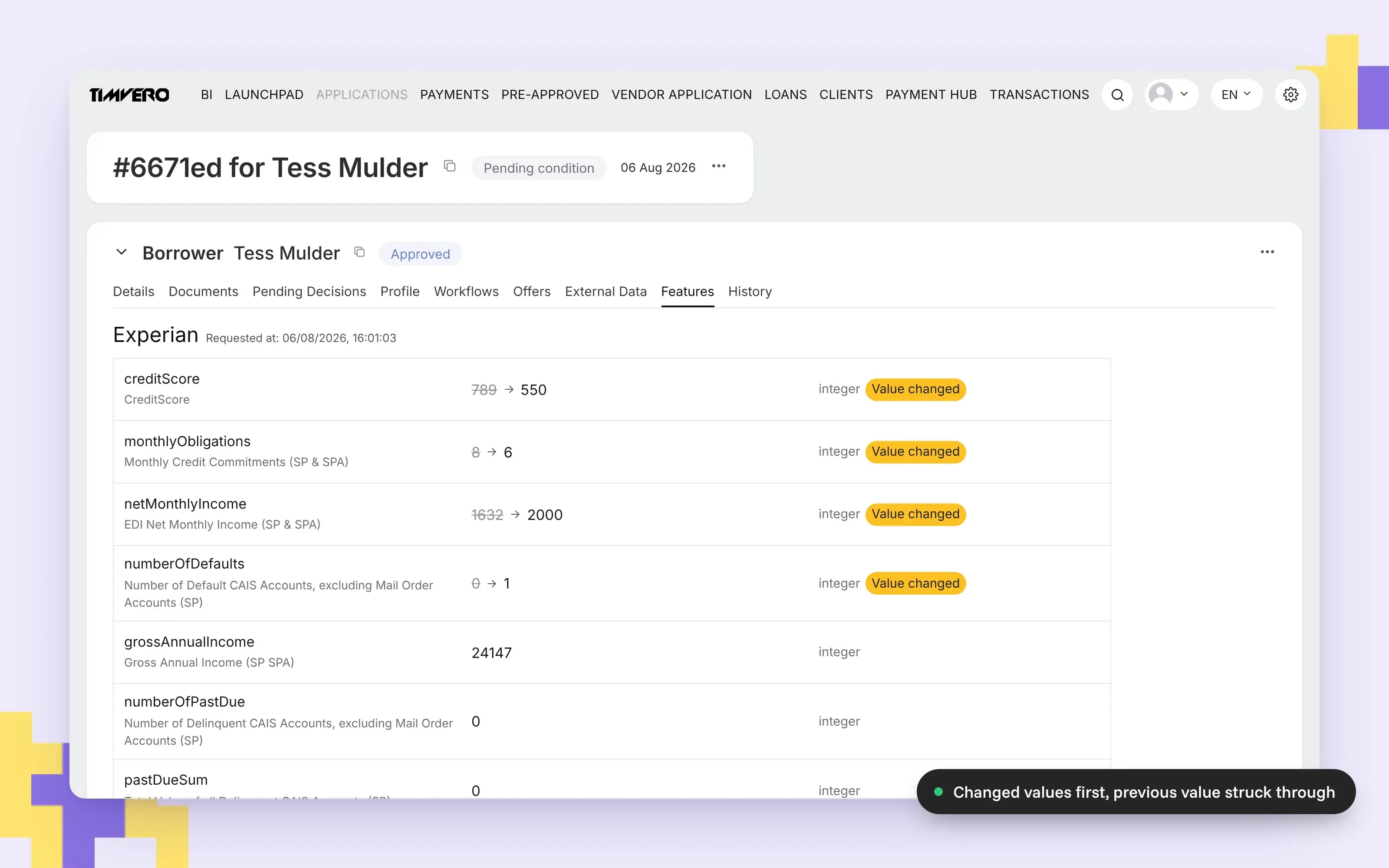
- Feature Comparison (NEW). The Features tab compares the two latest responses of a data source line by line and lists the changed rows first.
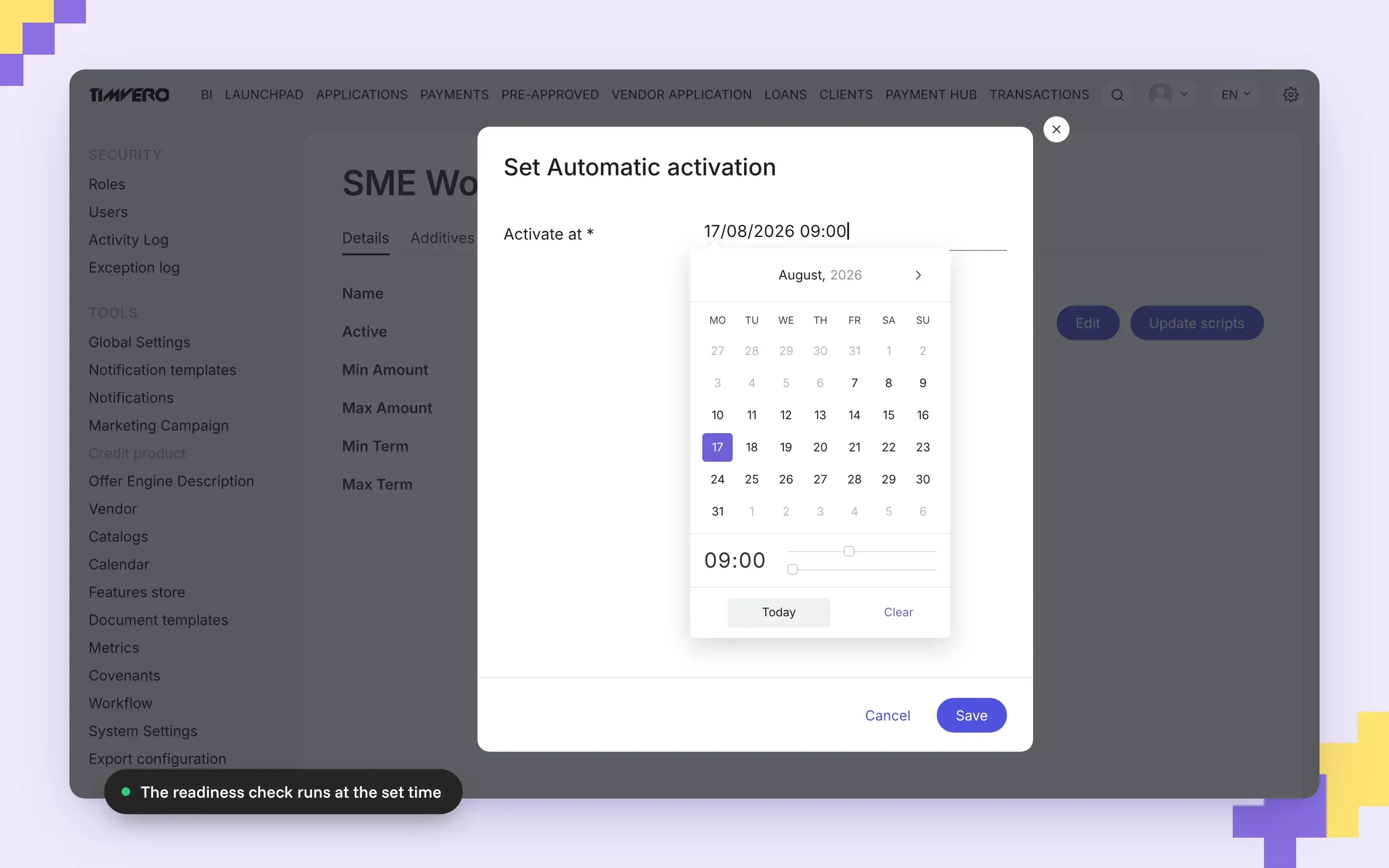
- Scheduled activation (IMPROVED). A Draft credit product goes live at a set date and time after the standard readiness check.
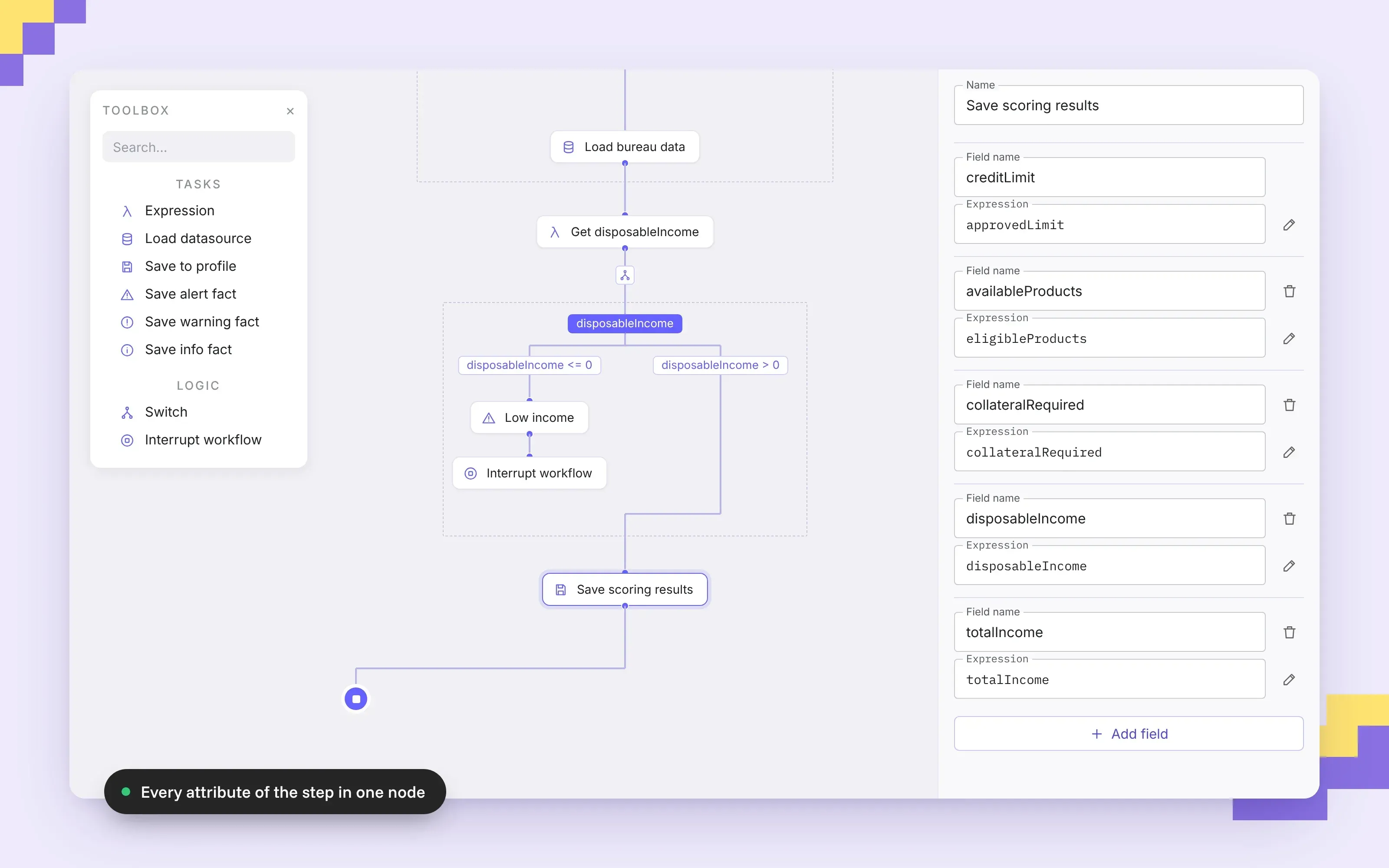
- Save to Profile (IMPROVED). One workflow node writes several profile attributes, each with its own expression.
- Configuration Export/Import (IMPROVED). Separate Export and Import permissions, file details before import, the business day calendar in the transfer, and an operations log.
- Interface and workflow (IMPROVED). Time in date filters, scrolling inside components, hidden credentials and workflow communication over Server-Sent Events.
Feature Comparison: See What Changed Since the Last Request
Origination rarely finishes in one day. A bureau report requested at the start of an application can be out of date by the time the application reaches a decision, so the data source is requested again. The second response arrives in full, and the underwriter has two documents of a hundred values each and one question: did anything change, and where?
Every response kept, the two latest compared
A repeated request to a data source no longer overwrites the previous response. The platform keeps every version, and the Features tab compares the two latest ones line by line:
- A changed row shows the previous value struck through next to the current value.
- Each changed row carries a Value changed badge, and changed rows are listed first within their data source.
- The header of each group shows when the data was requested.
- Rows that did not change are shown as before.
The underwriter reviews the differences first, and a missed change no longer turns into a decision made on stale data.
Records and actions on the External Data tab
The External Data tab lists the responses received, with the time of each request and the original file to download. In Edit Mode it adds two actions: invalidate an outdated record before a re-check, or add a record to the collection.
Works for every mapped data source
The comparison needs no setup in the admin panel. Versions, change marks and ordering are produced by the platform for every data source mapped in the Feature Store. Which data a source returns in each request mode is defined in the SDK by your development team.
On the application page, underwriters find the comparison under Participant → Features and the records under Participant → External Data.
Scheduled Activation: Credit Products Go Live on Time
A credit product is configured, tested and approved, and it has to go live on a specific day at a specific time. Until 8.4 someone had to be at the screen at that moment and press Activate. A reminder could be missed or the person could be away, and a product launched an hour late or a day early becomes a business problem.
Set the moment, cancel until then
A Draft product now has a Set Automatic activation action that asks for the date and time. The product page shows the scheduled moment, and Reset activation cancels it at any point before then. The action is available to users with the credit product edit permission, and no other configuration is required.
The same readiness check as a manual launch
At the scheduled time the platform runs the readiness check used for manual activation: at least one additive, and scripts for every required result type. A product that cannot be activated by hand cannot be activated on schedule either. One active version at a time still holds, so activating a scheduled version deactivates the version that was active.
A failed check stays visible
Nothing is activated silently. If the check fails, the product stays in Draft with a Product activation error label, and the Details tab links to the exception record with the cause. Fix the configuration, set a new time, and the label is cleared.
Save to Profile: One Node for Every Attribute
Scoring a client produces data points that the rest of the flow depends on: the credit limit, the products available, the collateral required and many loan conditions. They are kept on the client’s profile, and until 8.4 each attribute needed its own Save to Profile node. A decision tree that saved twenty attributes carried twenty nodes doing the same job, and every change to the profile meant finding the right one among them.
In 8.4 one Save to Profile node writes as many attributes as needed:
- Each row names a profile field and holds the expression that computes its value.
- Rows are added with Add field and removed with the delete icon.
- The designer checks that every field name is set and unique.
The whole profile update of a step sits in one place, so the tree gets shorter and a change to the profile is a single edit. Existing workflows keep working: a node that saves one attribute is a node with one row. The attributes available to save are the profile fields defined in the SDK.
Configuration Export/Import: Verified on Test, Applied to Production
Setting up a new environment is quick. Carrying a verified configuration from test to production is where gaps appear: roles, decline reasons, templates, mappings and reference rates all have to arrive intact. When production must match test exactly, for example to investigate an incident, the transfer has to be fast and leave no doubt about what was applied.
Built around control and traceability
- Split permissions. Export and Import are separate rights, so the role that prepares a configuration and the role that applies it can be different.
- File details before import. The platform shows which environment the file came from, who exported it and when. A damaged or foreign file is rejected before anything is touched.
- Business day calendar included. The calendar now travels out of the box, alongside roles, catalogs, templates, Feature Store and metric mappings, Offer Engine descriptors and form schemas.
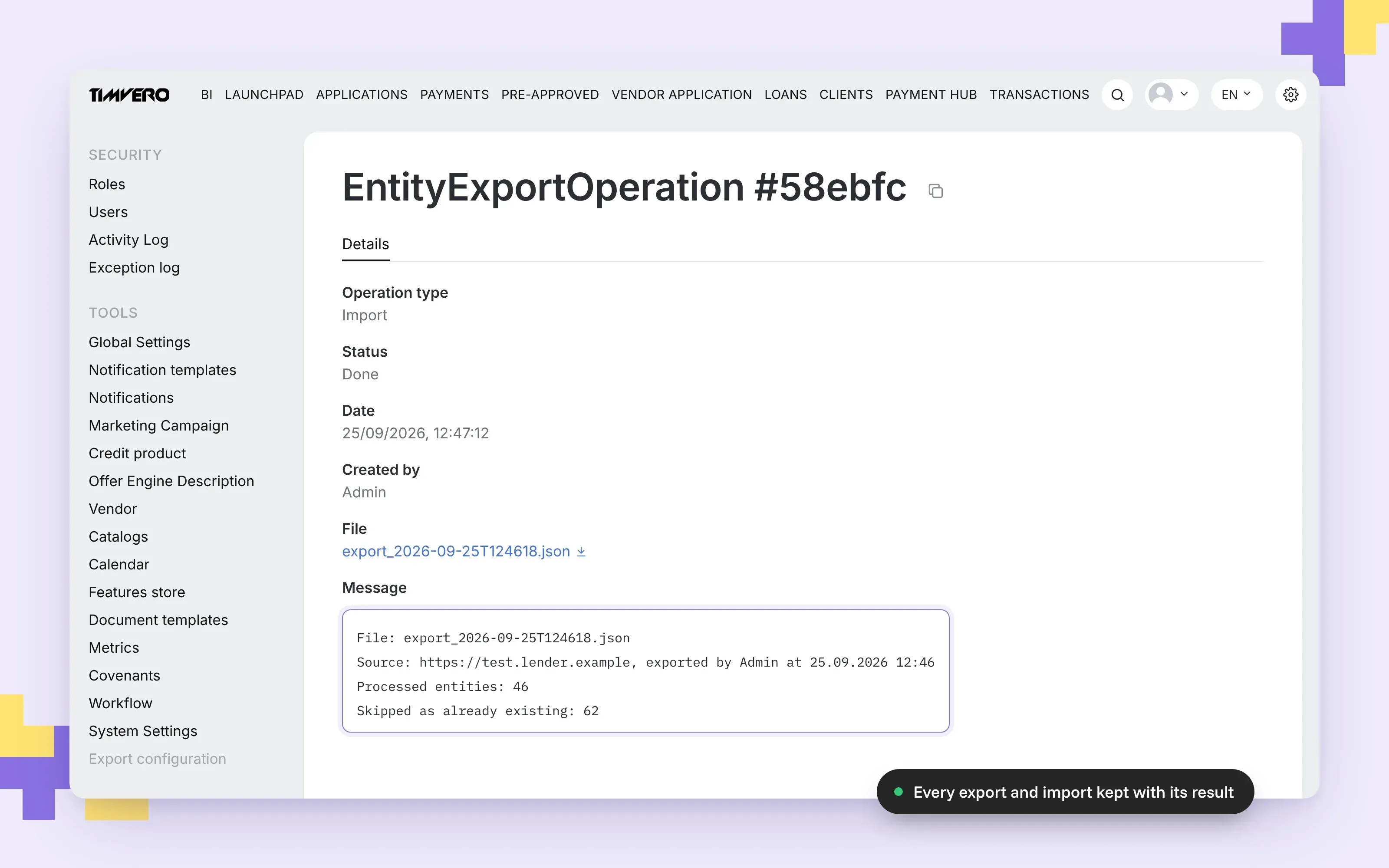
- Operations log. Every export and import is kept with its status, its file and its result: records applied, records skipped as already existing, and records that failed, with the reason.
Records that already exist on the target are not duplicated. Templates and descriptors that changed get a new version, and the previous one stays in history.
Setting it up
The tool sits under Settings → Export configuration in the admin panel, where authorised users run exports and imports and read the log. Grant the Export and Import permissions on the roles that need them. Both environments must run the same platform version, and the groups of configuration that travel are defined in the SDK.
Smaller Changes
- Time in date filters. Date filters on lists such as the Activity Log and the Launchpad accept a time of day, so a period can be narrowed to the hour.
- Scrolling inside components. Vertical scroll moved from the page to the component, which removes the layout jump when content expands.
- Credentials hidden. Secrets are no longer displayed on the System Settings page.
- Workflow over Server-Sent Events. The client opens the connection and the server streams events, with no callbacks to the client. The contract is simpler and the connection more resilient, and no configuration change is required.
What 8.4 Means for Running Lending Products
Each change in 8.4 moves a step that depended on someone being present or careful into the platform, and leaves the team a clear place to check the result.
| Area | What the platform does | What the team sees |
|---|---|---|
| Repeated data request | Keeps every response and compares the two latest | Changed rows first, with the previous value next to the current one |
| Product launch | Activates the product at the set time after the readiness check | A failed check leaves the product in Draft with a link to the cause |
| Profile update | Saves all attributes of a step from one node | One place to edit, with field names checked for gaps and duplicates |
| Configuration transfer | Carries the configuration, including the business day calendar | Separate rights, the file’s origin before import and a log of every operation |
The full list of changes, with a page for each feature, is in the timveroOS 8.4 release notes (opens in new tab).
Frequently Asked Questions
What is new in timveroOS 8.4?
timveroOS 8.4 adds Feature Comparison on the Features tab, scheduled activation of credit products, a Save to Profile node that writes several attributes at once, and a reworked configuration Export/Import with split permissions, file details and an operations log. It also adds time in date filters, hides credentials on System Settings and moves workflow communication to Server-Sent Events.
How does Feature Comparison show changed data?
When a data source is requested again, the Features tab compares the two latest responses line by line. A changed row shows the previous value struck through next to the current one, carries a Value changed badge and is listed first within its data source. The group header shows when the data was requested.
Does Feature Comparison need any configuration?
No. It works for every data source mapped in the Feature Store. Which data a source returns in each request mode is defined in the SDK by your development team.
What happens if a scheduled credit product fails the readiness check?
The product stays in Draft with a Product activation error label, and the Details tab links to the exception record with the cause. After the configuration is fixed and a new time is set, the label is cleared.
Do existing workflows need changes for the new Save to Profile node?
No. A node that saves one attribute becomes a node with one row. New rows can be added to the same node whenever a step needs to save more attributes.
What does configuration Export/Import transfer between environments?
Roles, catalogs, templates, Feature Store and metric mappings, Offer Engine descriptors, form schemas and, from 8.4, the business day calendar. Both environments must run the same platform version, and every export and import is recorded in the operations log with its result.

CEO at TIMVERO
Dmitriy Wolkenstein is the CEO of TIMVERO, leading the team building timveroOS and timveroAI. He writes about why the next generation of lending will be won at the infrastructure layer — and what it takes to get there.
LinkedinLatest News

Payment Hub: We Killed the Multi-Loan Payment Spreadsheet
timveroOS 8.3: Five Upgrades That Add Operational Control
timveroOS 8.2: Plain English In, Working Lending Logic Out

First Overview: timveroAI - How We Cut Lending System Implementation from Months to Days
timveroOS 8.1: The Release Your Team Will Notice Before You Brief Them
timveroOS 8.0: From Evaluation to Production in Days, Not Months
Schedule Overview Tab: Bringing Your Loan Intelligence Together

Embedded BI Dashboards: We Fixed the Two-System Headache

A New Top-Level Business Documentation Layer for timveroOS