



timveroOS 8.3: Five Upgrades That Add Operational Control
Version 8.3 is a control release. It does not add a new module to your menu — it closes the gaps where operational teams were previously working around the system: money movements that could not be proven complete, products that could be activated before they were ready, search results that showed records a user had no right to see, and a user directory maintained twice. Each of these is addressed at the level of the Building Platform beneath timveroOS, which means the fix is structural rather than cosmetic.
Five areas changed: transaction processing, product management, global search, the Form Builder, and roles with SSO. Here is what each one does and who feels it first.
Why “operational control” is the theme of this release
Lending operations fail quietly. A payment lands on the wrong date and gets fixed with a manual journal entry. A product copy gets activated with an incomplete pricing setup. An analyst finds a record they should not have been able to see. None of these break the system — they erode the audit trail, and the audit trail is what regulators, auditors, and your own risk committee actually inspect.
In a 2025 survey of 250 UK payments firms, 56% still relied on spreadsheets for reconciliation (Kani Payments, 2025 — vendor survey). Spreadsheet reconciliation is what teams fall back on when the platform cannot prove that a money movement finished.
Regulation is explicit about the cost. Under Regulation Z, a creditor must acknowledge a billing error notice within 30 days and resolve it within two complete billing cycles, and no later than 90 days (CFPB, 12 CFR § 1026.13) — and failure to properly credit a payment is itself an enumerated billing error. A servicing team that cannot reconstruct what happened to a specific payment is not just inefficient; it is exposed.
Vouchers: every money movement tracked to zero
The headline change in 8.3 is the voucher — a wallet that tracks the balance of one specific money movement, linked to the client.
.webp)
The voucher as proof of completion
For an incoming transaction, the voucher tracks what arrived and where it went. For an outgoing one, it tracks what the system registered as disbursed against what actually left. A voucher’s ideal state is a zero balance, and that zero is the built-in proof that the movement completed. Vouchers that need attention carry a hint in the Info column of the Payment Hub, so the exception list is generated by the platform rather than assembled by hand.
Corrections without workarounds
An unallocated remainder can now be refunded through a new outgoing transaction on the same voucher — without touching the original transaction. Three payment actions handle the non-standard cases directly: Cancel, Change Date, and Change Amount. Each one recalculates the loan automatically. The correction becomes a first-class recorded event instead of an adjustment someone has to explain later.
Reliable by construction
Underneath, transaction processing moved to a queue model: automatic retries with increasing intervals on temporary gateway errors, a manual-intervention status when retries are exhausted, and token-based claiming in clusters so no transaction is processed twice, even if a node goes down. This matters specifically because timveroOS runs in your own environment — self-hosted or private cloud — where distributed deployments are the norm rather than the exception.
Operations staff work vouchers in the Payment Hub menu and manage payments from the loan’s Payments tab. Project-specific behavior — automatic distribution plans, the trigger that marks an outgoing transaction successful — is configured on the Building Platform, not hard-coded by the vendor. That is the difference between a compliance feature you inherit and a loan servicing software (opens in new tab) layer your engineers can shape.
Product families: version control for your lending products
Product iteration runs through copies. Until 8.3, copying a product left no recorded link between source and copy, so similar products accumulated with no origin history.
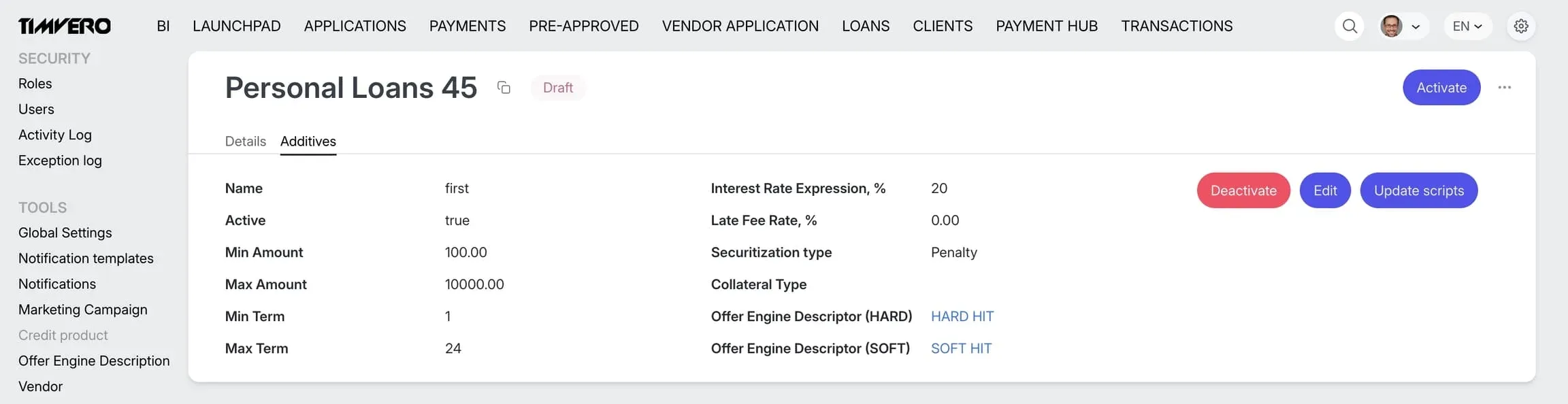
Derived products with explicit lineage
A copy can now be linked to its source as a derived product. The parent lists its derived products; each derived product shows its parent. Offer Engine scripts attached to the source’s additives copy automatically. The result is a product family with explicit history — variations that never lose track of how they relate to each other.
Activation you cannot do by accident
Activation is now a controlled step. The action is available only when the product has at least one additive and every additive has scripts for all required result types. Before activating, a confirmation dialog reports the parent product’s current status, so the decision is made with full context. Depending on project requirements, this also supports regenerating offers on in-flight applications when a derived product supersedes its parent.
Scripts and additives, decoupled
The old pricing setup had a circular dependency: you needed a script to create an additive, and an additive to test a script. In 8.3 the two are separated. Create the additive, author and test the script against it, then bind them with the Update scripts action. Every binding change is kept in the audit history.
For lenders running many near-identical products — a pattern typical in consumer lending software (opens in new tab) and specialty portfolios alike — this converts an informal naming convention into an auditable structure.
“Our clients rarely ask us for more features. They ask us to prove what happened. A voucher that closes at zero, an activation that cannot fire on an incomplete product, a script binding recorded in the audit history — that is the difference between an operations team that reconciles inside the platform and one that reconciles in a spreadsheet.”
— Dmitriy Wolkenstein, CEO, TIMVERO
Global search that respects access rights
Global Search in 8.3 returns only the objects the user has permission to view — sections a user cannot access simply do not surface. Each result shows which field matched the query (for example, matched: full name, email). Long result sets are paginated: 20 per page by default, adjustable to 25, 50, 75, or 100. And part of a name or login is now enough to find a user, instead of the exact full name.
.webp)
No configuration is required — permission filtering follows the user’s roles automatically. Which fields are indexed per object type remains a Building Platform setting, so the search surface is something your team defines rather than accepts.
Form Builder: what you see is what they get
The Form Builder preview is now WYSIWYG. While configuring a decision form, an administrator sees exactly what the end user will see during warning resolution — the ready dialog with its buttons and comment field. Nothing to configure; forms are still built in Settings → Catalogs → Form Builder. It is a small change that removes a specific class of misconfiguration, in the same spirit as the eight interface fixes shipped in timveroOS 8.1 (opens in new tab).
.webp)
SSO and multi-role access: one directory, not two
Organizations using a corporate identity provider previously maintained two user directories — one corporate, one inside timveroOS. Every new employee meant a manually created account; every role change meant a second update. Access design was further constrained by a hard limit of one role and one department per user, which forced teams to create ever more roles where a combination would have done.
.webp)
Keycloak joins Google as a supported SSO provider. On every sign-in, the platform reads roles from the provider token and maps them to platform roles via the case-sensitive External Role field. With user synchronization enabled, accounts are created automatically at first sign-in and kept current afterwards. Users can now hold multiple roles and departments, with access rights, counters, and BI dashboards combining across all of them.
| Capability | Before 8.3 | From 8.3 |
|---|---|---|
| SSO sign-in | Google only | Google + Keycloak |
| Roles from the corporate directory | No | Yes (with user-sync enabled) |
| Auto-creation of users via SSO | No | Yes (with user-sync enabled) |
| Roles per user | One | Multiple |
| Start page | Set on the role | First available menu item |
This is an access-control improvement before it is a convenience one. Credential abuse remains the most common initial access vector in breach data (Verizon Data Breach Investigations Report, 2025), and a single directory removes the orphaned-account problem that two directories create by design.
One caveat, stated plainly in the release documentation: External Role is case-sensitive and must match the token exactly. A user whose corporate roles map to nothing signs in with no roles and sees no pages. The Keycloak integration ships as a ready-made module but requires activation by the implementation team.
What 8.3 means in the SaaS vs custom build vs Building Platform choice
Every feature above exists because the platform’s behavior is defined in building blocks your team can reach — not in a vendor’s multi-tenant configuration screen, and not in code you had to write from scratch. That is the practical shape of the third path.
| Criterion | SaaS lending platforms | Custom build (in-house) | timveroOS Building Platform |
|---|---|---|---|
| Payment correction logic | Vendor-defined; workarounds for edge cases | Built and maintained by your team | Voucher model + three payment actions, distribution plans configurable |
| Audit trail depth | Opaque, vendor-controlled | Whatever you built | Explicit building blocks; binding changes recorded |
| Deployment topology | Multi-tenant cloud only | Self-hosted | Self-hosted or private cloud, cluster-safe queue processing |
| Identity integration | Provider list set by vendor | Built per provider | Keycloak + Google modules, role mapping configurable |
| Time to launch a bespoke product | 6–12 months on the vendor roadmap | 18–24 months from scratch | 3–6 weeks with timveroAI (opens in new tab) |
| Engineering team required | 1–2 (configuration only) | 8–15 engineers | 1–3 engineers plus timveroAI |
For context: on legacy architectures, launching or customizing a product “can take six months or more” (McKinsey, 2021 — verify currency). AMIO Bank reached a production MVP on timveroOS in four months after three failed attempts elsewhere, with an 8x faster time-to-yes and a 60% reduction in cost per loan.
One clarification on the last row: timveroAI is the RAG-grounded implementation agent that accelerates configuration work — 70–80% of implementation effort, with human approval gates and shadow-run mode for generated changes. It is not the runtime decisioning layer and does not make credit decisions.
“None of the controls in 8.3 could ship as platform capabilities if the architecture were closed. Our clients reach the building blocks directly, so the gaps they hit in production become platform changes rather than support tickets. That is the loop a multi-tenant configuration screen cannot reproduce.”
— Dmitriy Wolkenstein, CEO, TIMVERO
The platform behind these releases runs $5.5B+ in AUM across 13+ countries and processes 7,000+ daily loan applications — for banks (opens in new tab), fintechs (opens in new tab), and credit unions (opens in new tab) on the same architecture. See the full client case studies (opens in new tab) for the operational detail behind those numbers.
Frequently Asked Questions
What is a voucher in timveroOS 8.3?
A voucher is a wallet that tracks the balance of one specific money movement, linked to the client. For incoming transactions it records what arrived and where it was allocated; for outgoing ones, what was registered as disbursed versus what actually left. A zero balance is proof the movement completed.
How do you correct a payment posted on the wrong date?
Use the Change Date action on the loan’s Payments tab. Alongside Cancel and Change Amount, it resolves non-standard payment situations directly, and the loan recalculates automatically. No manual adjusting entry is needed, and the correction is recorded as an event.
What is a derived product?
A derived product is a product copy explicitly linked to its source. The parent lists its derived products and each derived product shows its parent, creating a product family with recorded lineage. Offer Engine scripts attached to the source’s additives are copied automatically.
Which SSO providers does timveroOS support in 8.3?
Google and Keycloak. Keycloak ships as a ready-made module activated by the implementation team. On each sign-in, roles are read from the provider token and mapped to platform roles through the case-sensitive External Role field, keeping access aligned with your corporate directory.
Can a timveroOS user hold more than one role?
Yes. From 8.3, users can hold multiple roles and departments simultaneously. Access rights, counters, and BI dashboards combine across all assigned roles. After login, a user lands on the first menu item available to them; the per-role start page setting has been removed.
Does upgrading to 8.3 require reconfiguration?
Most changes require none. The Form Builder preview and global search permission filtering work automatically. Product activation conditions apply immediately. Only two items need setup: the External Role field on roles mapping from your directory, and Keycloak module activation by the implementation team.
See 8.3 in Your Own Environment
If your team is currently proving payment completion in spreadsheets or maintaining a second user directory by hand, 8.3 removes both workarounds at the platform level. Book a walkthrough of the Payment Hub, product families, and SSO mapping against your own operational setup.
Request a demo → (opens in new tab) · Read the full 8.3 release notes → (opens in new tab)
-rsbxq-400x250.webp)
CEO at TIMVERO
Dmitriy Wolkenstein is the CEO of TIMVERO, leading the team building timveroOS and timveroAI. He writes about why the next generation of lending will be won at the infrastructure layer — and what it takes to get there.
LinkedinLatest News
timveroOS 8.2: Plain English In, Working Lending Logic Out
Payment Hub: We Killed the Multi-Loan Payment Spreadsheet
First Overview: timveroAI - How We Cut Lending System Implementation from Months to Days
timveroOS 8.1: The Release Your Team Will Notice Before You Brief Them
timveroOS 8.0: From Evaluation to Production in Days, Not Months
Schedule Overview Tab: Bringing Your Loan Intelligence Together
Embedded BI Dashboards: We Fixed the Two-System Headache
A New Top-Level Business Documentation Layer for timveroOS
Release Notes - Version 7.12: Launchpad, Covenants, Metrics, and more