



timveroOS 8.2: Plain English In, Working Lending Logic Out
Every lending team carries a backlog of small changes that never feel small enough to ship. A clause in the loan agreement template needs to change because legal updated the wording. A notification needs new copy for a marketing campaign. The maximum loan amount needs to be calculated a little differently for one borrower segment. None of these are hard problems — but each one has traditionally meant filing a ticket with internal IT, or worse, opening a change request with the vendor. timveroOS 8.2 removes that bottleneck. The headline of this release is an AI assistant that turns a plain-English description into working code or a finished template, inserted into the editor with one click — a new acceleration layer on the timveroOS Building Platform that lets the person who understands the business change author the logic themselves. Alongside it ship an in-place workflow testing upgrade and seven targeted UI refinements.
What’s in the 8.2 Release
This is a focused release: one new feature that changes who can author logic in the platform, and two improvements that make the people already building in it faster and less error-prone.
- AI Script Writing Assistant
NEW— a context-aware assistant embedded in five editors that generates code and templates from plain-English instructions. - Workflow Testing Tool
IMPROVED— run unlimited validations against real participants and collateral directly inside the workflow modeling tool, with no deployment to a test environment. - 8.2 UI Updates
IMPROVED— seven refinements that reclaim screen space and remove visual friction across the platform.
The AI Script Writing Assistant
The single biggest change in 8.2 is who gets to make a change at all.
The problem: small adjustments, disproportionate cost
In most lending systems, the gap between “I know exactly what needs to change” and “the change is live” is filled with other people’s calendars. A business analyst knows the new covenant logic. A product manager knows the notification wording. A pricing lead knows how the offer should be calculated. But none of them can apply the change directly, so it queues behind an engineering sprint or a vendor’s roadmap. The change is trivial; the coordination around it is not.
The solution: describe it, review it, insert it
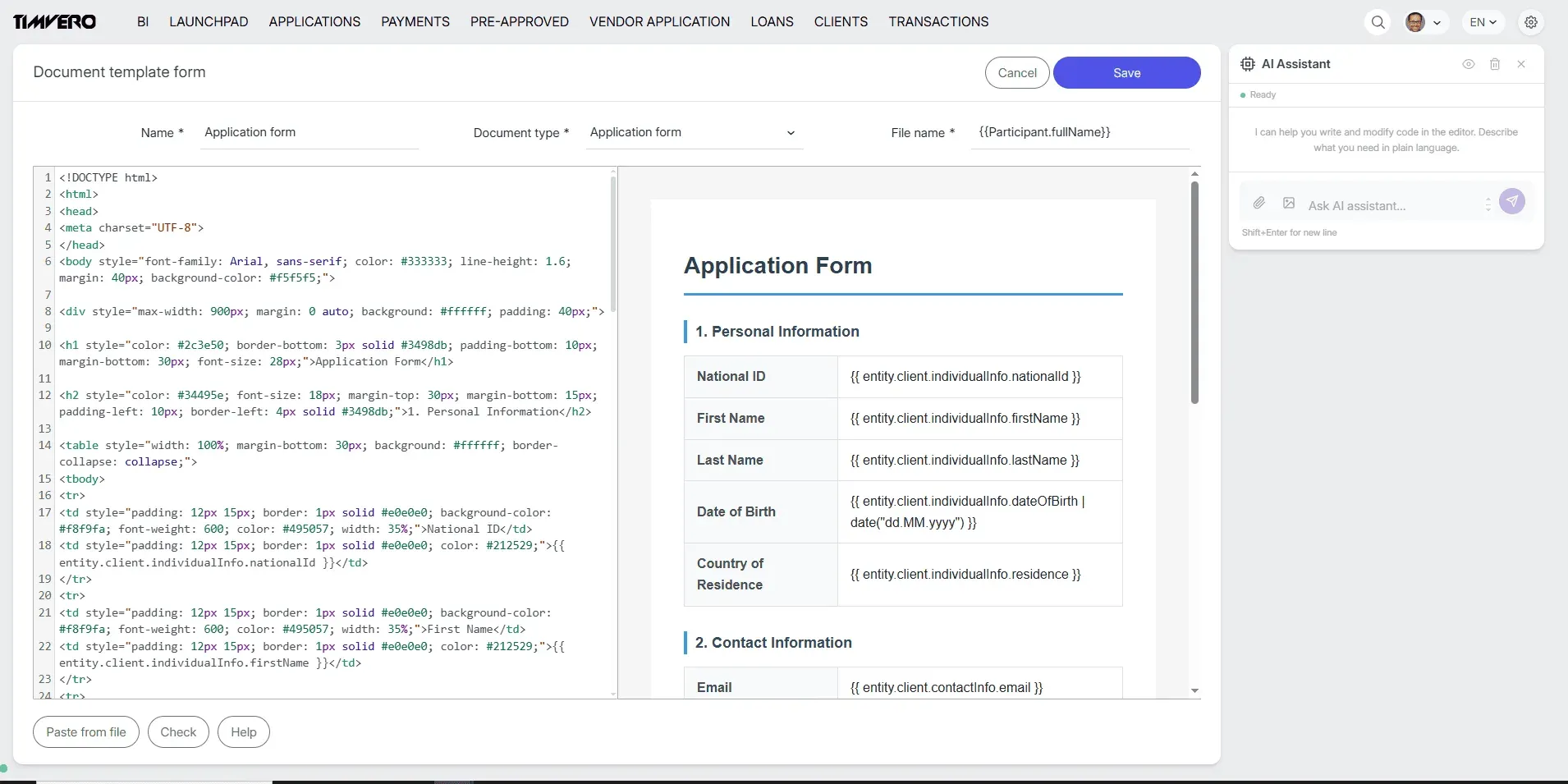
The AI Script Writing Assistant is an LLM agent that has access to the system context and the underlying data model — the attributes behind document and notification templates, and the variables used for offer calculation. You describe the change you want in a few plain-English sentences, and the assistant generates the code or template, ready to insert. The work that used to require a developer now takes minutes and a non-developer, with no additional staff pulled in to complete it.
The assistant is grounded in the platform’s own data model rather than guessing from generic training data — the same RAG-grounded approach behind timveroAI (opens in new tab), our implementation acceleration agent. It produces a suggestion; a human reviews it and clicks to insert it. The editor remains the source of truth, and nothing reaches production without a person approving it. This is the same human-in-the-loop discipline we apply across the Building Platform: the AI compresses the work, the human keeps the control.
Where it lives
Once enabled, the assistant panel appears on the right-hand side of five editor pages: the Offer Engine, Documents, Notifications, Metrics, and Covenants. Enablement is a single platform-level toggle on the Building Platform (SDK) — there is no per-instance configuration and no additional admin setup. The one place it deliberately does not appear is the Workflow Designer, where decision flows are validated through the testing tool below rather than authored in free text.
“The bottleneck in lending software was never the size of the change — it was the number of people a small change had to pass through. We built the assistant so the person who understands the business edit can make it, review it, and ship it, without it sitting in someone else’s queue for a sprint.”
— Dmitriy Wolkenstein, CEO, TIMVERO
The Workflow Testing Tool
Changing underwriting algorithms and decision logic is routine — a new regulatory requirement, a revised credit policy, a new business strategy. Validating those changes before they touch production has never been routine.
The problem: nowhere safe to try it
Before routing live applications through a new decision flow, you have to be certain it behaves correctly — there is no room for error in a credit decision. The traditional answer was to deploy the new workflow into a separate test environment and run dummy applications through it, which is slow, clutters the environment, and never quite matches how real data behaves.
The solution: validate where you build
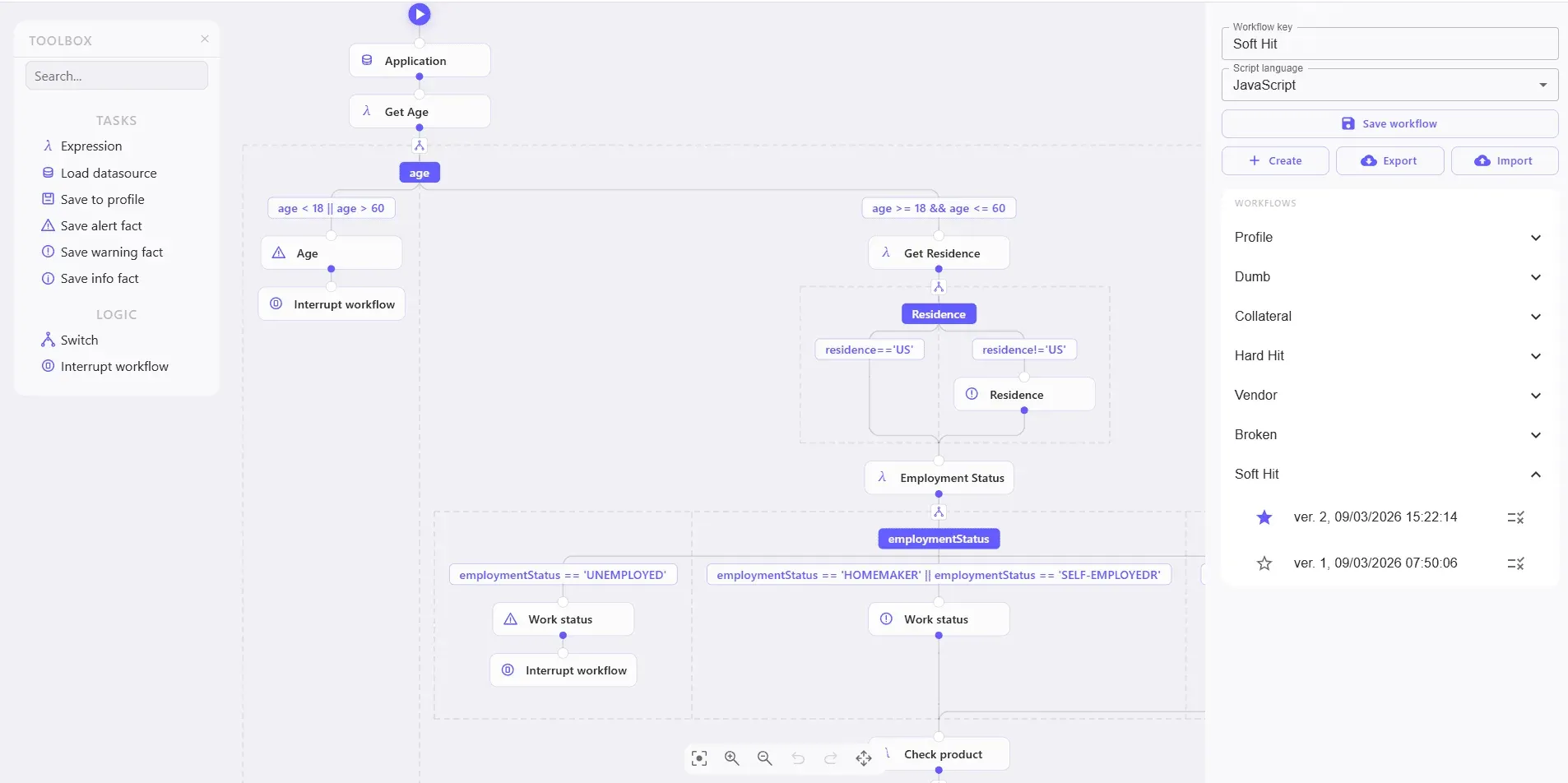
In 8.2 you run unlimited validations with different scenarios directly from the workflow modeling tool — against real participants or collateral pulled from existing applications. A Validate icon now sits next to every flow version; clicking it opens a validation panel inline with the flow editor. Triggered Facts, the populated profile, the data sources consulted, and the full execution path all appear in the same panel. You confirm the flow does what you expect before deployment, and the production environment stays clean because there is no need to import flows that aren’t production-ready yet. The tool is part of the Workflow Tool and deploys in one piece, with no configuration required.
This is the kind of capability that’s only possible when testing is built into the architectural layer rather than bolted on around it. Decision flows are Building Blocks (opens in new tab) on the platform, so validating one against real data is a native operation, not a separate project.
Seven UI Refinements
The third part of 8.2 is a round of interface work. Individually, none of these break a workflow; together, the friction they remove is what daily users notice first. The principle behind all seven: same screen real estate, more usable.
- Pagination moved to the bottom of the screen — same width, more rows visible per page.
- Synchronized Notes and AI Assistant panels now share consistent positioning and visual treatment, so there’s no visual switching cost between the two right-side tools.
- A dedicated System Settings page replaces the old popup, giving settings room to organize and breathe.
- Collapsible Operation details on the Calculation Details tab — more information available without overcomplicating the screen.
- A refreshed Credit Data tab with a cleaner schedule overview layout; nothing removed, just easier to read.
- Workflow Tool UI aligned with the rest of the platform’s visual language.
- An improved multiselect element — selected options now stay in the dropdown and can be added or removed individually, instead of clearing and starting over to drop a single item.
All seven are purely visual and interaction refinements. There are no configuration changes, migrations, or permission updates required to adopt them.
Why This Release Fits the Building Platform Model
timveroOS is built as a third path between off-the-shelf SaaS and an 18-to-24-month custom build: a working system from day one, with architectural control through the SDK, deployed in your own environment. 8.2 is a clean example of what that model makes possible. A SaaS product can’t let you author covenant logic in your own data model, because you don’t have access to the data model. A custom build could, but only after you’ve spent a year building the editors, the testing harness, and the configuration surface yourself. The Building Platform ships those as building blocks — and 8.2 puts an AI assistant on top of them.
| Criterion | SaaS lending platforms | Custom build (in-house) | timveroOS Building Platform |
|---|---|---|---|
| Who can author a template or pricing change | Vendor, via roadmap request | Your engineering team | Business owner, via the AI assistant + human review |
| Time for a small logic change | Weeks on the vendor’s queue | One engineering sprint | Minutes, reviewed and inserted |
| Testing a new decision flow | Limited sandbox, dummy data | Build your own test harness | In-place validation against real participants |
| Data model access | None | Full, after you build it | Full, through the SDK from day one |
To be clear about scope: the AI Script Writing Assistant accelerates configuration and authoring work. It is distinct from the XAI scoring engine, which is the runtime decisioning building block that produces explainable credit decisions at origination and servicing. The assistant helps you build and adjust the lending product; the XAI engine runs inside the product every time a decision is made. 8.2 advances the first; it does not change the second.
Frequently Asked Questions
What does the AI Script Writing Assistant do in timveroOS 8.2?
It is a context-aware AI assistant embedded in five timveroOS editors. You describe a change in plain English — a template edit, a notification, an offer calculation — and the assistant generates the code or template grounded in your system’s data model, ready to review and insert with one click.
Which editors include the AI assistant?
The assistant panel appears in five editors once enabled: the Offer Engine, Documents, Notifications, Metrics, and Covenants. It is intentionally not available in the Workflow Designer, where flows are validated through the Workflow Testing Tool instead.
Do I need a developer to use the 8.2 AI assistant?
No. The assistant is designed so a non-developer can describe a change and apply it after review, without involving internal IT or the vendor. A person still reviews and approves every suggestion before it is inserted, keeping a human in the loop.
How does the Workflow Testing Tool work?
A Validate icon next to each flow version opens a panel inline with the flow editor. You run unlimited validations against real participants or collateral from existing applications and see the Triggered Facts, populated profile, data sources consulted, and full execution path — all without deploying to a test environment.
Do the 8.2 UI updates require any migration or reconfiguration?
No. All seven UI updates are purely visual and interaction refinements. There are no configuration changes, data migrations, or permission updates required to adopt them.
How do I enable the AI Script Writing Assistant?
Enablement is a single platform-level toggle configured on the Building Platform (SDK). There is no per-instance configuration and no additional admin-panel setup; once the toggle is on, the assistant appears in the five supported editors.
See timveroOS 8.2 in Action
If your team has a backlog of “small” changes waiting on someone else’s sprint, 8.2 is the release that clears it. See how the AI assistant and in-place workflow testing work on your own lending logic.
-rsbxq-400x250.webp)
CEO at TIMVERO
Dmitriy Wolkenstein is the CEO of TIMVERO, leading the team building timveroOS and timveroAI. He writes about why the next generation of lending will be won at the infrastructure layer — and what it takes to get there.
LinkedinLatest News

First Overview: timveroAI - How We Cut Lending System Implementation from Months to Days
timveroOS 8.3: Five Upgrades That Add Operational Control

Payment Hub: We Killed the Multi-Loan Payment Spreadsheet
timveroOS 8.1: The Release Your Team Will Notice Before You Brief Them
timveroOS 8.0: From Evaluation to Production in Days, Not Months
Schedule Overview Tab: Bringing Your Loan Intelligence Together
Embedded BI Dashboards: We Fixed the Two-System Headache
A New Top-Level Business Documentation Layer for timveroOS
Release Notes - Version 7.12: Launchpad, Covenants, Metrics, and more